
Bot Commands
Complete guide to bot trading commands
/start
Get started with Polycule and set up your Polygon wallet. This command initializes your account and provides instructions on funding your wallet.
This command shows your Polygon wallet address, current balances, and instructions for getting started with trading on Polymarket.
Basic Commands
/home
View the main dashboard with your wallet balances, trading options, and quick access buttons.
/help
Get comprehensive help information about all available commands and functionality.
/trending
Browse top trending markets on Polymarket by category (Politics, Crypto, Sports, etc.)
/search
Search for specific markets by category or keyword. The bot will prompt you to enter a search term.
Trading Commands
/positions
View all your current positions on Polymarket with detailed information about each position including market, outcome, current price, and P&L.
This command also displays your open limit orders and allows you to cancel them.
Market URL
Send any Polymarket URL to the bot to get detailed market information and trading options.
The bot will display market details and provide buttons to trade YES/NO or place limit orders.
Wallet Commands
/wallet
View your wallet details including POL and USDC balances, along with options to withdraw, swap tokens, or export your private key.
/fund
Get instructions on how to fund your Polycule wallet with POL and bridge to USDC for trading.
This command provides your wallet address and instructions for bridging POL to USDC.
Bridging
Polycule makes it easy to bridge assets from Solana to Polygon for trading on Polymarket.
Solana to Polygon Bridging
When bridging in from Solana, Polycule uses deBridge and collects no fees. The only fees collected are from deBridge itself. Every time you bridge in, you collect points on deBridge's points program. If the bridging fails, simply try again. We use deBridge, so no burning mechanism occurs, and your funds are safe.
Automatic Token Swap
Polycule automatically swaps 2% of your SOL into POL to pay for gas fees on Polygon. If the swap fails, you can manually swap your POL using the /wallet command. You can also use the /wallet command with 'Swap POL to USDC' or 'Swap USDC to POL' buttons to manage your token balances. If you need more gas or want to have less POL, you can manually swap using the /wallet command.
How to Bridge In
To bridge in, you can click the 'Fund Wallet' button under the wallet command or use the /fund command directly. This provides all necessary instructions for transferring assets from Solana to your Polycule wallet.
Advanced Features
Limit Orders
Place limit orders to buy or sell at your desired price. When viewing a market, select "Limit Buy" or use the limit sell option in the positions menu.
Market Graphs
View price history charts for any market by selecting the "Graph" button when viewing a market.
Swap Tokens
Use the wallet menu to swap between POL and USDC with the "Swap POL to USDC" and "Swap USDC to POL" options.
Copy Trading
/copytrade
Access Polycule's comprehensive copy trading system. Automatically follow successful Polymarket traders and mirror their trades with customizable settings.
This command opens the copy trading management interface where you can:
- Add new copy trades by entering wallet addresses
- Configure copy amounts (percentage, fixed amount, or ranges)
- Set advanced filters (liquidity, volume, odds limits)
- Manage sell configurations
- Pause/resume or delete existing copy trades
- Share your copy trading strategies with others
📚 For detailed copy trading instructions, visit our comprehensive Copy Trading Guide
Referral Program
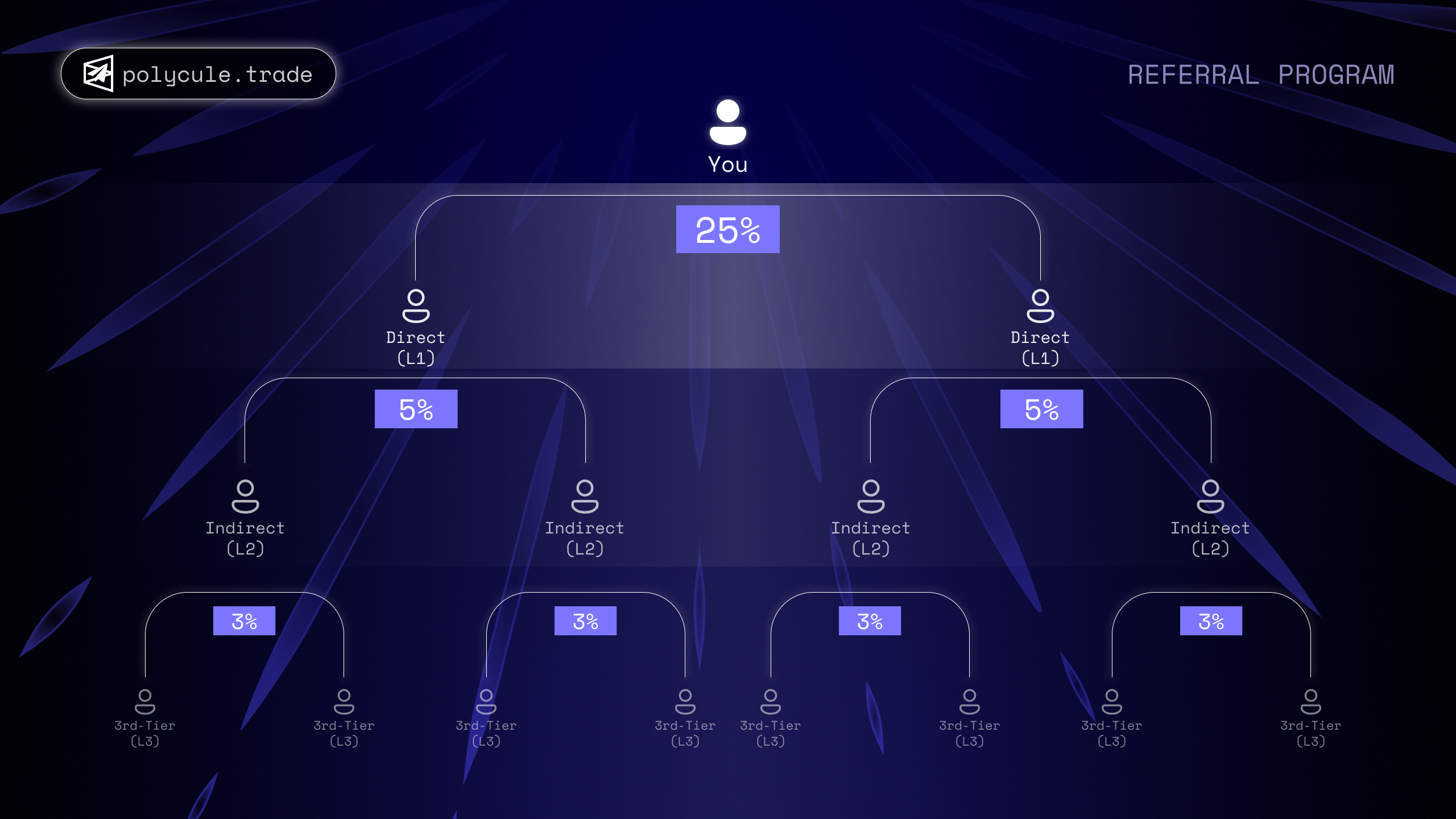
Welcome to Polycule's Revenue Share Program! 🚀
We're excited to introduce Polycule's Referral Program, designed to reward you for helping grow our trading community. Earn passive income every time your referrals trade on Polycule—the more they trade, the more you earn! 📈
🔗 Your Referral Link
When you join Polycule, you'll receive a unique referral link. Share this with others, and whenever someone signs up using your link and starts trading, you'll earn a percentage of the fees generated from their trades.
More trading volume = Higher earnings! 🚀
At Polycule, we believe in rewarding our community.
That's why users who sign up using a referral link receive a 10% discount on trading fees!
✅ How to Get Your Discount:
- Sign up through a referral link
- Start trading and automatically pay 10% less!
💸 Save on every trade & start earning with Polycule today! 🚀
$PCULE Airdrop
💰 How to Claim Your Airdrop
To claim your $PCULE airdrop, follow these simple steps:
- Use the
/rewardscommand to view your airdrop allocation - Export your funding wallet's private key from the wallet menu
- Import the private key into Phantom wallet
- Your $PCULE tokens will be automatically distributed to your wallet
Note: Make sure to use Phantom wallet on the Polygon network to receive your $PCULE tokens.
📊 Check Your Airdrop Status
Use the /rewards command to see:
- Your total airdrop allocation in $PCULE tokens
- Amount already distributed
- Remaining tokens to be distributed
- Current USD value of your airdrop
Fee Structure
Polycule charges a base fee of 1% on all trades, but you can reduce your fees significantly by holding $PCULE tokens. The more $PCULE you hold, the lower your trading fees become.
Permanent discounts: Fee tiers are based on your current $PCULE balance
No staking required: Simply hold $PCULE in any wallet to qualify
Maximum savings: Save up to 50% on trading fees at the highest tier